" Reveals Features And How To Use BlackBerry Z10 "
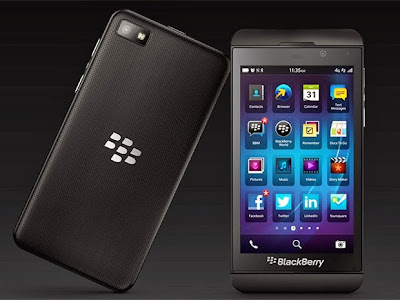
BlackBerry 's latest Z10 million highly evocative charm the hearts of its users. This
makes the Z10 BlackBerry users still have to adapt long enough to be
able to explore all the features and sophistication of BlackBerry hp Z10
's. This
time we will try to uncover the mystery of the BlackBerry Z10 and Z10
how to use a BlackBerry so we really - really can feel the greatness of
the BlackBerry hp Z10.
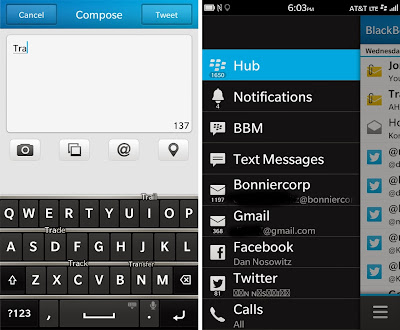
Show Message SentWant to see the reports of messages that have been sent? You can create a report this message appears and no, it all depends on your needs of course. However, if you want to bring up a report sent message, you can open the
BlackBerry Hub feature, tap on the three dots in the lower right corner
, then Settings > Display and Actions and enable the " Show Message
Sent." With menceklis " Show Message Sent ", then you will see reports on every message you send to your colleagues.Account set up Hub
If
you have multiple accounts but want to reduce the noise due to incoming
messages, you can set up an account that will be displayed in the main
view BlackBerry Hub. This means you can hide a message on Twitter, for example. To
set it up you can log in to the BlackBerry Hub, tap on the three dots
in the lower right corner, then Settings > Management Hub and switch
the account that you want or do not want from the list of your accounts. Just a list of accounts that you select will appear.
Add an email account
The following tips to add your email account. Step in to add this email account is fairly easy. You
just go to the BlackBerry Hub, tap on the three dots in the lower
right corner, then Settings > Email Accounts > Add Account. On
the next page you can select the Email, Calendar, and additional
contacts you, and also add other services such as Twitter, Facebook,
Linked In and Evernote.
Email
Email use is very important, you will receive all the latest information on your BlackBerry through your email account.
Disable push email
By turning off push email, you can save your battery life. To do this, you can go to Settings > Accounts and select the email account you want to change . Scroll down to the bottom of the page and change the " Use if supported ". Then press Save at the top right side of the screen.
Attach a file
Hold
and press the space key on the keyboard on the screen and move the Z10
will bring up the panel with the Attach icon on it. Touch the icon and then you can attach pictures, video, audio, contacts, appointments, or even a file.
Formatting email
Hold and press the space bar to hide the on - screen keyboard, then press the icon that says " Format ". A
WYSIWYG menu will appear and give you the control to manage all types
of font bold, italic, underline, and other features such as font size
and color.
Keyboard
BlackBerry
users are very familiar with Qwerty keyboard, but only because the
BlackBerry has abandoned the hardware keyboard on the touchscreen to
replace the Z10 BB does not mean there are no tricks to be learned and
tips to assist you in using the keyboard on this BBZ10. Here are tips on the use of the keyboard deck BBZ10.
Swipe to bring up the keyboardWhatever you do, you can use your finger to bring up the keyboard on the bottom screen of your phone. This
is useful when you need to type something quickly without having to
first open the grid and look for short messages SMS icon.
Hiding keyboard
Press
and hold the space bar, or scroll the screen with your finger from the
top of the keyboard to the bottom of the screen to hide the keyboard.
Choosing words that predictedZ10 BlackBerry keyboard is quite good at predicting words as you type before you finish typing the word you mean. This is done by highlighting the words on your keyboard to select. To
do that, you can go to Settings > Language and Input > On-
Screen Keyboard, and then select In - Column Text Prediction in Display
settings.
Support multiple languages
If
you type in English and French, for example, at the same time you can
set the BlackBerry to detect the language you are typing and giving
suggestions and appropriate corrections automatically on the words you
use. To set this up, you can go to Settings > Language and Input > Input Languages > Add / Remove Languages.
Keyboard Volume Mute
So
you do not feel uncomfortable with the sound generated when you type,
you can set this by going to Settings > Language and Input > On-
Screen Keyboard and set the slider at the top of the page to the desired
volume level. You can set it to the lowest level of sound that is 0 to eliminate the overall sound when you type.
Turn off Word Animation
Even
though the animation on your phone screen look beautiful, sometimes
animation can also interfere with your comfort when using the phone. To
stop this application, you can go to Settings > Language and Input
> On- Screen Keyboard and switch off the Show animation.
" Reveals Features And How To Use BlackBerry Z10 "
BlackBerry 's latest Z10 million highly evocative charm the hearts of its users. This
makes the Z10 BlackBerry users still have to adapt long enough to be
able to explore all the features and sophistication of BlackBerry hp Z10
's. This
time we will try to uncover the mystery of the BlackBerry Z10 and Z10
how to use a BlackBerry so we really - really can feel the greatness of
the BlackBerry hp Z10.
Show Message SentWant to see the reports of messages that have been sent? You can create a report this message appears and no, it all depends on your needs of course. However, if you want to bring up a report sent message, you can open the
BlackBerry Hub feature, tap on the three dots in the lower right corner
, then Settings > Display and Actions and enable the " Show Message
Sent." With menceklis " Show Message Sent ", then you will see reports on every message you send to your colleagues.Account set up Hub
If
you have multiple accounts but want to reduce the noise due to incoming
messages, you can set up an account that will be displayed in the main
view BlackBerry Hub. This means you can hide a message on Twitter, for example. To
set it up you can log in to the BlackBerry Hub, tap on the three dots
in the lower right corner, then Settings > Management Hub and switch
the account that you want or do not want from the list of your accounts. Just a list of accounts that you select will appear.
Add an email account
The following tips to add your email account. Step in to add this email account is fairly easy. You
just go to the BlackBerry Hub, tap on the three dots in the lower
right corner, then Settings > Email Accounts > Add Account. On
the next page you can select the Email, Calendar, and additional
contacts you, and also add other services such as Twitter, Facebook,
Linked In and Evernote.
Email
Email use is very important, you will receive all the latest information on your BlackBerry through your email account.
Disable push email
By turning off push email, you can save your battery life. To do this, you can go to Settings > Accounts and select the email account you want to change . Scroll down to the bottom of the page and change the " Use if supported ". Then press Save at the top right side of the screen.
Attach a file
Hold
and press the space key on the keyboard on the screen and move the Z10
will bring up the panel with the Attach icon on it. Touch the icon and then you can attach pictures, video, audio, contacts, appointments, or even a file.
Formatting email
Hold and press the space bar to hide the on - screen keyboard, then press the icon that says " Format ". A
WYSIWYG menu will appear and give you the control to manage all types
of font bold, italic, underline, and other features such as font size
and color.
Keyboard
BlackBerry
users are very familiar with Qwerty keyboard, but only because the
BlackBerry has abandoned the hardware keyboard on the touchscreen to
replace the Z10 BB does not mean there are no tricks to be learned and
tips to assist you in using the keyboard on this BBZ10. Here are tips on the use of the keyboard deck BBZ10.
Swipe to bring up the keyboardWhatever you do, you can use your finger to bring up the keyboard on the bottom screen of your phone. This
is useful when you need to type something quickly without having to
first open the grid and look for short messages SMS icon.
Hiding keyboard
Press
and hold the space bar, or scroll the screen with your finger from the
top of the keyboard to the bottom of the screen to hide the keyboard.
Choosing words that predictedZ10 BlackBerry keyboard is quite good at predicting words as you type before you finish typing the word you mean. This is done by highlighting the words on your keyboard to select. To
do that, you can go to Settings > Language and Input > On-
Screen Keyboard, and then select In - Column Text Prediction in Display
settings.
Support multiple languages
If
you type in English and French, for example, at the same time you can
set the BlackBerry to detect the language you are typing and giving
suggestions and appropriate corrections automatically on the words you
use. To set this up, you can go to Settings > Language and Input > Input Languages > Add / Remove Languages.
Keyboard Volume Mute
So
you do not feel uncomfortable with the sound generated when you type,
you can set this by going to Settings > Language and Input > On-
Screen Keyboard and set the slider at the top of the page to the desired
volume level. You can set it to the lowest level of sound that is 0 to eliminate the overall sound when you type.
Turn off Word Animation
Even
though the animation on your phone screen look beautiful, sometimes
animation can also interfere with your comfort when using the phone. To
stop this application, you can go to Settings > Language and Input
> On- Screen Keyboard and switch off the Show animation.
" Reveals Features And How To Use BlackBerry Z10 "
BlackBerry 's latest Z10 million highly evocative charm the hearts of its users. This
makes the Z10 BlackBerry users still have to adapt long enough to be
able to explore all the features and sophistication of BlackBerry hp Z10
's. This
time we will try to uncover the mystery of the BlackBerry Z10 and Z10
how to use a BlackBerry so we really - really can feel the greatness of
the BlackBerry hp Z10.
Show Message SentWant to see the reports of messages that have been sent? You can create a report this message appears and no, it all depends on your needs of course. However, if you want to bring up a report sent message, you can open the
BlackBerry Hub feature, tap on the three dots in the lower right corner
, then Settings > Display and Actions and enable the " Show Message
Sent." With menceklis " Show Message Sent ", then you will see reports on every message you send to your colleagues.Account set up Hub
If
you have multiple accounts but want to reduce the noise due to incoming
messages, you can set up an account that will be displayed in the main
view BlackBerry Hub. This means you can hide a message on Twitter, for example. To
set it up you can log in to the BlackBerry Hub, tap on the three dots
in the lower right corner, then Settings > Management Hub and switch
the account that you want or do not want from the list of your accounts. Just a list of accounts that you select will appear.
Add an email account
The following tips to add your email account. Step in to add this email account is fairly easy. You
just go to the BlackBerry Hub, tap on the three dots in the lower
right corner, then Settings > Email Accounts > Add Account. On
the next page you can select the Email, Calendar, and additional
contacts you, and also add other services such as Twitter, Facebook,
Linked In and Evernote.
Email
Email use is very important, you will receive all the latest information on your BlackBerry through your email account.
Disable push email
By turning off push email, you can save your battery life. To do this, you can go to Settings > Accounts and select the email account you want to change . Scroll down to the bottom of the page and change the " Use if supported ". Then press Save at the top right side of the screen.
Attach a file
Hold
and press the space key on the keyboard on the screen and move the Z10
will bring up the panel with the Attach icon on it. Touch the icon and then you can attach pictures, video, audio, contacts, appointments, or even a file.
Formatting email
Hold and press the space bar to hide the on - screen keyboard, then press the icon that says " Format ". A
WYSIWYG menu will appear and give you the control to manage all types
of font bold, italic, underline, and other features such as font size
and color.
Keyboard
BlackBerry
users are very familiar with Qwerty keyboard, but only because the
BlackBerry has abandoned the hardware keyboard on the touchscreen to
replace the Z10 BB does not mean there are no tricks to be learned and
tips to assist you in using the keyboard on this BBZ10. Here are tips on the use of the keyboard deck BBZ10.
Swipe to bring up the keyboardWhatever you do, you can use your finger to bring up the keyboard on the bottom screen of your phone. This
is useful when you need to type something quickly without having to
first open the grid and look for short messages SMS icon.
Hiding keyboard
Press
and hold the space bar, or scroll the screen with your finger from the
top of the keyboard to the bottom of the screen to hide the keyboard.
Choosing words that predictedZ10 BlackBerry keyboard is quite good at predicting words as you type before you finish typing the word you mean. This is done by highlighting the words on your keyboard to select. To
do that, you can go to Settings > Language and Input > On-
Screen Keyboard, and then select In - Column Text Prediction in Display
settings.
Support multiple languages
If
you type in English and French, for example, at the same time you can
set the BlackBerry to detect the language you are typing and giving
suggestions and appropriate corrections automatically on the words you
use. To set this up, you can go to Settings > Language and Input > Input Languages > Add / Remove Languages.
Keyboard Volume Mute
So
you do not feel uncomfortable with the sound generated when you type,
you can set this by going to Settings > Language and Input > On-
Screen Keyboard and set the slider at the top of the page to the desired
volume level. You can set it to the lowest level of sound that is 0 to eliminate the overall sound when you type.
Turn off Word Animation
Even
though the animation on your phone screen look beautiful, sometimes
animation can also interfere with your comfort when using the phone. To
stop this application, you can go to Settings > Language and Input
> On- Screen Keyboard and switch off the Show animation.
Unknown
Unknown
00:45
00:45
JunaidiNaylaisikan alamat tempat anda
" Reveals Features And How To Use BlackBerry Z10 "
BlackBerry 's latest Z10 million highly evocative charm the hearts of its users. This
makes the Z10 BlackBerry users still have to adapt long enough to be
able to explore all the features and sophistication of BlackBerry hp Z10
's. This
time we will try to uncover the mystery of the BlackBerry Z10 and Z10
how to use a BlackBerry so we really - really can feel the greatness of
the BlackBerry hp Z10.
Show Message SentWant to see the reports of messages that have been sent? You can create a report this message appears and no, it all depends on your needs of course. However, if you want to bring up a report sent message, you can open the
BlackBerry Hub feature, tap on the three dots in the lower right corner
, then Settings > Display and Actions and enable the " Show Message
Sent." With menceklis " Show Message Sent ", then you will see reports on every message you send to your colleagues.Account set up Hub
If
you have multiple accounts but want to reduce the noise due to incoming
messages, you can set up an account that will be displayed in the main
view BlackBerry Hub. This means you can hide a message on Twitter, for example. To
set it up you can log in to the BlackBerry Hub, tap on the three dots
in the lower right corner, then Settings > Management Hub and switch
the account that you want or do not want from the list of your accounts. Just a list of accounts that you select will appear.
Add an email account
The following tips to add your email account. Step in to add this email account is fairly easy. You
just go to the BlackBerry Hub, tap on the three dots in the lower
right corner, then Settings > Email Accounts > Add Account. On
the next page you can select the Email, Calendar, and additional
contacts you, and also add other services such as Twitter, Facebook,
Linked In and Evernote.
Email
Email use is very important, you will receive all the latest information on your BlackBerry through your email account.
Disable push email
By turning off push email, you can save your battery life. To do this, you can go to Settings > Accounts and select the email account you want to change . Scroll down to the bottom of the page and change the " Use if supported ". Then press Save at the top right side of the screen.
Attach a file
Hold
and press the space key on the keyboard on the screen and move the Z10
will bring up the panel with the Attach icon on it. Touch the icon and then you can attach pictures, video, audio, contacts, appointments, or even a file.
Formatting email
Hold and press the space bar to hide the on - screen keyboard, then press the icon that says " Format ". A
WYSIWYG menu will appear and give you the control to manage all types
of font bold, italic, underline, and other features such as font size
and color.
Keyboard
BlackBerry
users are very familiar with Qwerty keyboard, but only because the
BlackBerry has abandoned the hardware keyboard on the touchscreen to
replace the Z10 BB does not mean there are no tricks to be learned and
tips to assist you in using the keyboard on this BBZ10. Here are tips on the use of the keyboard deck BBZ10.
Swipe to bring up the keyboardWhatever you do, you can use your finger to bring up the keyboard on the bottom screen of your phone. This
is useful when you need to type something quickly without having to
first open the grid and look for short messages SMS icon.
Hiding keyboard
Press
and hold the space bar, or scroll the screen with your finger from the
top of the keyboard to the bottom of the screen to hide the keyboard.
Choosing words that predictedZ10 BlackBerry keyboard is quite good at predicting words as you type before you finish typing the word you mean. This is done by highlighting the words on your keyboard to select. To
do that, you can go to Settings > Language and Input > On-
Screen Keyboard, and then select In - Column Text Prediction in Display
settings.
Support multiple languages
If
you type in English and French, for example, at the same time you can
set the BlackBerry to detect the language you are typing and giving
suggestions and appropriate corrections automatically on the words you
use. To set this up, you can go to Settings > Language and Input > Input Languages > Add / Remove Languages.
Keyboard Volume Mute
So
you do not feel uncomfortable with the sound generated when you type,
you can set this by going to Settings > Language and Input > On-
Screen Keyboard and set the slider at the top of the page to the desired
volume level. You can set it to the lowest level of sound that is 0 to eliminate the overall sound when you type.
Turn off Word Animation
Even
though the animation on your phone screen look beautiful, sometimes
animation can also interfere with your comfort when using the phone. To
stop this application, you can go to Settings > Language and Input
> On- Screen Keyboard and switch off the Show animation.